If your website still shows "Not Secure" in the browser address bar, you're losing visitors, rankings, and revenue every single day. SSL certificates have gone from a nice-to-have to an absolute requirement for any website — and in 2026, the consequences of not having one are more severe than ever.
What Is an SSL Certificate?
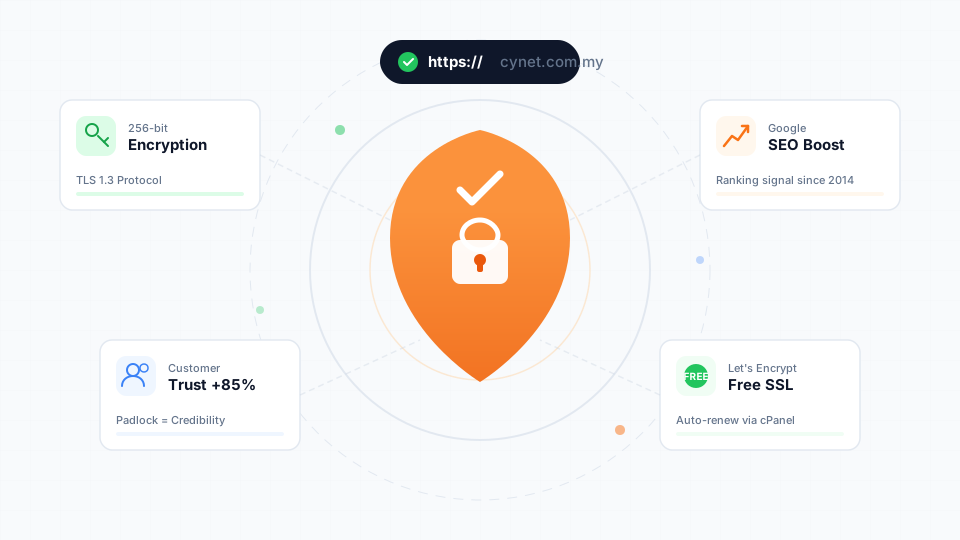
SSL (Secure Sockets Layer) — technically now TLS (Transport Layer Security) — is a protocol that encrypts the connection between a visitor's browser and your web server. When your site has an SSL certificate installed, it uses HTTPS instead of HTTP, and browsers display a padlock icon in the address bar.
What SSL does:
- Encrypts all data transmitted between visitor and server
- Verifies your website's identity
- Prevents man-in-the-middle attacks
- Protects sensitive information (passwords, payment details, personal data)
5 Reasons SSL Is Non-Negotiable
1. Google Requires It for Rankings
Google has used HTTPS as a ranking signal since 2014, and its importance has only grown. In 2026, Chrome and other browsers actively warn visitors away from HTTP sites with prominent "Not Secure" warnings.
Impact on SEO:
- HTTPS sites rank higher than HTTP equivalents
- Google Search Console flags missing HTTPS as an issue
- Core Web Vitals assessments assume HTTPS
- Google may refuse to index some HTTP-only pages
2. Browsers Warn Visitors Away
Modern browsers don't just passively note the absence of SSL — they actively discourage visitors from proceeding:
- Chrome: Shows "Not Secure" in red text next to the URL
- Firefox: Displays a crossed-out padlock with a warning
- Safari: Labels the site as "Not Secure" in the address bar
- Edge: Blocks form submissions on non-HTTPS pages
3. It Protects Your Visitors
Even if your website doesn't process payments or collect sensitive data, SSL still protects your visitors:
- Login credentials — if your site has any login form (WordPress admin, customer accounts), credentials are transmitted in plain text without SSL
- Form submissions — contact forms, newsletter signups, and search queries are all visible to anyone monitoring the network
- Session cookies — attackers can hijack user sessions on HTTP connections
- Privacy — ISPs and network operators can see exactly which pages your visitors access on HTTP sites
4. It's Required for Modern Web Features
Many modern web technologies require HTTPS to function:
- HTTP/2 and HTTP/3 — faster page loading protocols only work over HTTPS
- Service Workers — needed for PWAs (Progressive Web Apps) and offline functionality
- Geolocation API — browsers block location access on HTTP sites
- Camera/microphone access — blocked on HTTP
- Payment Request API — online payment flows require HTTPS
5. It Builds Customer Trust
Trust signals matter, especially for Malaysian businesses competing for online customers:
- The padlock icon signals legitimacy
- "HTTPS" in the URL shows professionalism
- Customers are more likely to complete purchases on secure sites
- Business partners and advertisers may require HTTPS
Types of SSL Certificates
Domain Validated (DV)
- Verification: Confirms you own the domain
- Speed: Issued in minutes
- Cost: Free (Let's Encrypt) or included with hosting
- Best for: Blogs, personal sites, small business websites
- Visual: Padlock icon in browser
Organization Validated (OV)
- Verification: Confirms domain ownership + organization identity
- Speed: 1-3 business days
- Cost: RM 200–500/year
- Best for: Business websites, e-commerce stores
- Visual: Padlock icon + organization name in certificate details
Extended Validation (EV)
- Verification: Rigorous business verification process
- Speed: 1-2 weeks
- Cost: RM 500–2000/year
- Best for: Banks, large e-commerce, government sites
- Visual: Padlock + organization name visible in certificate viewer
How to Get a Free SSL Certificate
All Cynet hosting plans include a free SSL certificate through Let's Encrypt. Here's how to activate it:
- Log in to your cPanel dashboard
- Navigate to Security → SSL/TLS Status
- Click Run AutoSSL to automatically issue and install certificates for all your domains
- Wait 2-3 minutes for the process to complete
- Verify by visiting your site with
https://— you should see the padlock icon
Common SSL Issues and Fixes
Mixed Content Warnings
After installing SSL, you might see "mixed content" warnings if your site loads some resources (images, scripts, stylesheets) over HTTP.
Fix: Update all internal URLs from http:// to https://. In WordPress, use the "Better Search Replace" plugin to update URLs in the database.
Redirect Loop
If you're getting redirect loops after enabling SSL, check your .htaccess file and WordPress settings:
// In wp-config.php
define('FORCESSLADMIN', true);
Certificate Renewal
Let's Encrypt certificates expire every 90 days. On Cynet hosting, AutoSSL handles renewal automatically — no action needed. If you're using a paid certificate, set a calendar reminder 30 days before expiry.
Take Action Today
If your website doesn't have SSL yet, fix it today — it's literally free and takes 5 minutes with Cynet hosting. The benefits to your security, SEO, and customer trust are immediate and measurable.
Already have SSL? Make sure you've set up proper HTTP → HTTPS redirects so no visitor accidentally lands on an insecure version of your site.
Need help? Our Help Center has detailed guides, or contact our support team for assistance.